Regex Generator Module
The RegexGenerator module continuously creates one pseudo-random regex at a
time for later Zeek-side use.
It uses the shared LLM module over Redis, validates the generated regex
against a benign corpus, and stores accepted regexes in a dedicated local
SQLite database that later Slips modules can read through DBManager.
What it does
The module:
Reads its configuration from
config/slips.yamlDiscovers runtime-ready LLM backends using the shared LLM registry
Chooses the next regex type with weighted random selection
Sends one generation request over
llm_requestWaits for the matching
llm_responseValidates the regex and tests it against a benign corpus
Stores accepted results in local SQLite. Rejected results are only persisted if explicitly enabled.
Supported regex types:
dns_domainurifilenametls_snicertificate_cn
Configuration
Example section in config/slips.yaml:
regex_generator:
  enabled: false
  create_log_file: false
  generation_interval_seconds: 5
  allowed_backends: []
  llm_temperature: 1.2
  llm_max_tokens: 80
  llm_response_timeout_seconds: 90
  recent_history_size: 0
  max_regex_length: 180
  regex_validation_timeout_seconds: 2
  benign_match_strength_threshold: 75
  type_weights:
    dns_domain: 1
    uri: 1
    filename: 1
    tls_sni: 1
    certificate_cn: 1
  store_dir: output/regex_generator
  persistent_store_dir: databases/regex_store
  store_rejected_regexes: false
  max_stored_rejected_regexes: 10000
  seed_benign_samples: true

whitelists:
  tranco_top_benign_limit: 1000
Configuration reference:
enabled: enables or disables the module.create_log_file: createsoutput/regex_generator.logwith detailed module progress messages. This file rotates on the same globalparameters.rotation/parameters.rotation_periodschedule used by the current Slips run.generation_interval_seconds: delay between completed generation cycles. Set0to start the next cycle immediately after the previous one finishes.allowed_backends: preferred backend aliases for this module.llm_temperature: generation temperature. Kept high to keep outputs varied.llm_max_tokens: max tokens for the LLM reply. The module asks for one regex line only, so keep this small.llm_response_timeout_seconds: soft warning threshold while waiting for the matchingllm_response. The module keeps waiting after this. Set0to disable the warning.recent_history_size: compatibility knob kept at0. Prompt history is not sent to the LLM; repetition is checked locally.max_regex_length: hard reject longer regexes.regex_validation_timeout_seconds: hard wall-clock timeout for local regex validation and benign-corpus matching. This prevents one pathological regex from freezing the module. Set0to disable it.benign_match_strength_threshold: score from0to100used during the benign scan. A regex is rejected only if its strongest benign match reaches or exceeds this threshold. Higher values are more permissive.type_weights: weighted random choice among the supported regex types.store_dir: directory containingbenign_corpus.sqliteandgenerated_regexes.sqlite. Absolute paths are used as-is. Relative paths are resolved inside the current Slips run output directory. The defaultoutput/regex_generatortherefore becomes<run_output_dir>/regex_generator.persistent_store_dir: stable directory for the regex SQLite files. Relative paths are resolved insideparameters.permanent_dir; the defaultdatabases/regex_storetherefore becomes<permanent_dir>/databases/regex_store. If set, it takes precedence overstore_dirand lets the generator reuse the same DBs across many Slips restarts.store_rejected_regexes: stores rejected regexes in SQLite for audit/debug purposes. Defaultfalseso discarded candidates do not fill the disk.max_stored_rejected_regexes: retention cap for rejected rows whenstore_rejected_regexesis enabled. Set0for unlimited retention.seed_benign_samples: seed the benign DB once with a small built-in sample.whitelists.tranco_top_benign_limit: number of ordered Tranco whitelist domains reused as benign data byRegexGeneratorand the offline coverage report.
LLM request and response usage
The module uses the existing shared LLM channels only:
request channel:
llm_requestresponse channel:
llm_response
Each generation request includes:
request_idrequester = "RegexGenerator"backendmessagestemperaturemax_tokensmetadata.regex_typemetadata.prompt_versionmetadata.generation_nonce
The prompt requires the model to return exactly one regex line. No JSON, explanation, or code fences. The parser still accepts JSON-shaped replies as a fallback for compatibility, but the active prompt is raw-regex only.
After the reply arrives, the module does not reject on any benign hit. It
streams the benign corpus for the selected type, computes a benign
match-strength score for each regex/string match, and rejects only if some
benign string reaches or exceeds benign_match_strength_threshold.
V1 keeps one request in flight at a time, so response correlation is simple:
only the matching request_id is accepted.
If the local LLM is slow, the module keeps waiting and only logs a warning
after llm_response_timeout_seconds.
If create_log_file is enabled, the module also writes detailed progress logs
to:
output/regex_generator.log
This file records:
selected regex type
selected backend
published
llm_requestrequest_idslow-wait warnings while the LLM is still working
accepted regexes
rejected regexes and rejection reasons
Accepted regexes are stored in the configured persistent store by default:
<permanent_dir>/databases/regex_store/generated_regexes.sqlite
If persistent_store_dir is empty, the fallback location is
<run_output_dir>/regex_generator/generated_regexes.sqlite.
Rejected regexes are tracked in memory during the current run to reduce cheap
repeats, but they are not stored on disk unless store_rejected_regexes is
enabled.
Acceptance pipeline
After the matching llm_response arrives, the module:
Extracts one regex line from the LLM reply
Rejects empty or malformed results
Applies static safety validation
Checks local duplicates with a bloom filter and exact SQLite lookup
Streams the benign corpus for the selected type
Computes a benign match-strength score for each regex/string match
Rejects only if some benign string reaches the configured threshold
Stores accepted regexes for later use
Static validation rejects:
non-ASCII regexes
regexes longer than
max_regex_lengthlookbehind
backreferences
unbounded
.*-style prefix/suffix patternsobviously broad patterns such as
.*and.+nested wildcard structures that risk catastrophic backtracking
invalid syntax
The benign match-strength score is an estimate from 0 to 100. It is
computed per regex and per benign string using the strongest match span found
by Python re.finditer().
For one matched span, the score is:
score =
  40 * span_ratio
  + 12 * start_bonus
  + 12 * end_bonus
  + 16 * full_bonus
  + 30 * specificity_ratio
  - 18 * wildcard_penalty
The result is clipped to 0..100. The regex keeps the highest score it
obtains against that benign string. If any benign string reaches or exceeds
benign_match_strength_threshold, the regex is rejected.
The terms mean:
span_ratio = matched_span_length / benign_string_lengthstart_bonus = 1if the match starts at offset0, else0end_bonus = 1if the match ends at the final character, else0full_bonus = 1if the match covers the entire benign string, else0specificity_ratio = literal_chars / (literal_chars + meta_tokens)wildcard_penalty = min(1.0, wildcard_points / ((literal_chars + meta_tokens) / 2))
Regex-specific features are measured from the regex text itself:
literal_charscounts explicit alphanumeric and common structural literal characters such as-,_,/,:,,,@, and=escaped literals such as
\.count as literal charactersmeta_tokenscounts regex syntax such as.,[],*,+,?, groups, anchors, and generic escapeswildcard_pointspenalize broad constructs:.*or.+adds2.5bare
.adds1.5[character classes add1.2*,+, and?add1.0generic escapes such as
\walso add penalty
Examples:
Regex
^google\.com$against benign stringgoogle.comfull span match, starts at
0, ends at the end, full-match bonus appliesspecificity is high because most of the pattern is literal
wildcard penalty is low
score is very high, so this benign match is rejected
Regex
googleagainst benign stringgoogle.comonly part of the string is covered
it starts at
0but does not end at the final characterno full-match bonus
score is lower and may stay below the threshold
Regex
.*commay match a long suffix, but it is penalized heavily by the wildcard term
this keeps broad permissive patterns from automatically looking “strong”
Benign corpus and bloom filters
The module creates a benign corpus DB once and can seed it with a small sample for all five regex types.
On each run, it also imports domain entries from the configured Slips local whitelist file into the benign corpus for the matching domain-like regex types:
dns_domaintls_snicertificate_cn
If the daily Tranco whitelist has already been downloaded by Slips, the module also imports the ordered configured Tranco top benign domains from Redis into the same domain-like benign corpus.
During runtime, the module also listens for tw_closed. When a finished time
window belongs to one of the host IPs of the machine running Slips, it checks
that host TW for alerts and evidence:
if the host TW has any alert or any evidence, it imports nothing from that TW
if the host TW has zero alerts and zero evidence, it imports additional benign strings from that clean local TW
The runtime benign import currently uses:
DNS query names ->
dns_domainHTTP hostnames ->
dns_domainTLS
server_name->tls_snicertificate
subjectCN ->certificate_cnfilenames derived from HTTP URIs ->
filename
The module logs the total alert count, total evidence count, and a separate best-effort anomaly-evidence count for that finished host TW. The anomaly count is informative only; the actual import gate is strict zero alerts and zero evidence.
Redis storage note:
Slips still stores the full downloaded Tranco whitelist in Redis under
tranco_whitelisted_domainswhile preserving download order.RegexGeneratorreads the configured number of top-ranked entries from that ordered whitelist cache when it needs benign high-reputation domains for domain-like regex testing.The number of domains read is configured with
whitelists.tranco_top_benign_limit.
It also builds one in-memory bloom filter per benign type and one bloom filter
for generated regex hashes, but these do not replace the benign corpus scan.
They help with exact membership checks and future scale improvements, while the
acceptance decision still requires computing the benign match-strength score
against the benign corpus and rejecting the regex only if some benign string
reaches or exceeds benign_match_strength_threshold.
The current benign acceptance gate is:
SELECT value FROM benign_strings WHERE regex_type = ?
streamed line by line while the module computes the benign match-strength score for each string. The regex is rejected only if a score reaches the configured threshold.
Reading accepted regexes from other modules
Later modules should not open the SQLite files directly.
Use the DB helpers:
self.db.get_generated_regexes(regex_type="dns_domain", limit=100)
self.db.get_generated_regexes_count(regex_type="dns_domain")
These helpers return accepted regexes by default.
Offline coverage report
There is also a standalone offline report script for estimating how much the accepted regexes cover several reference populations for a given Slips run.
Example HTML report overview:
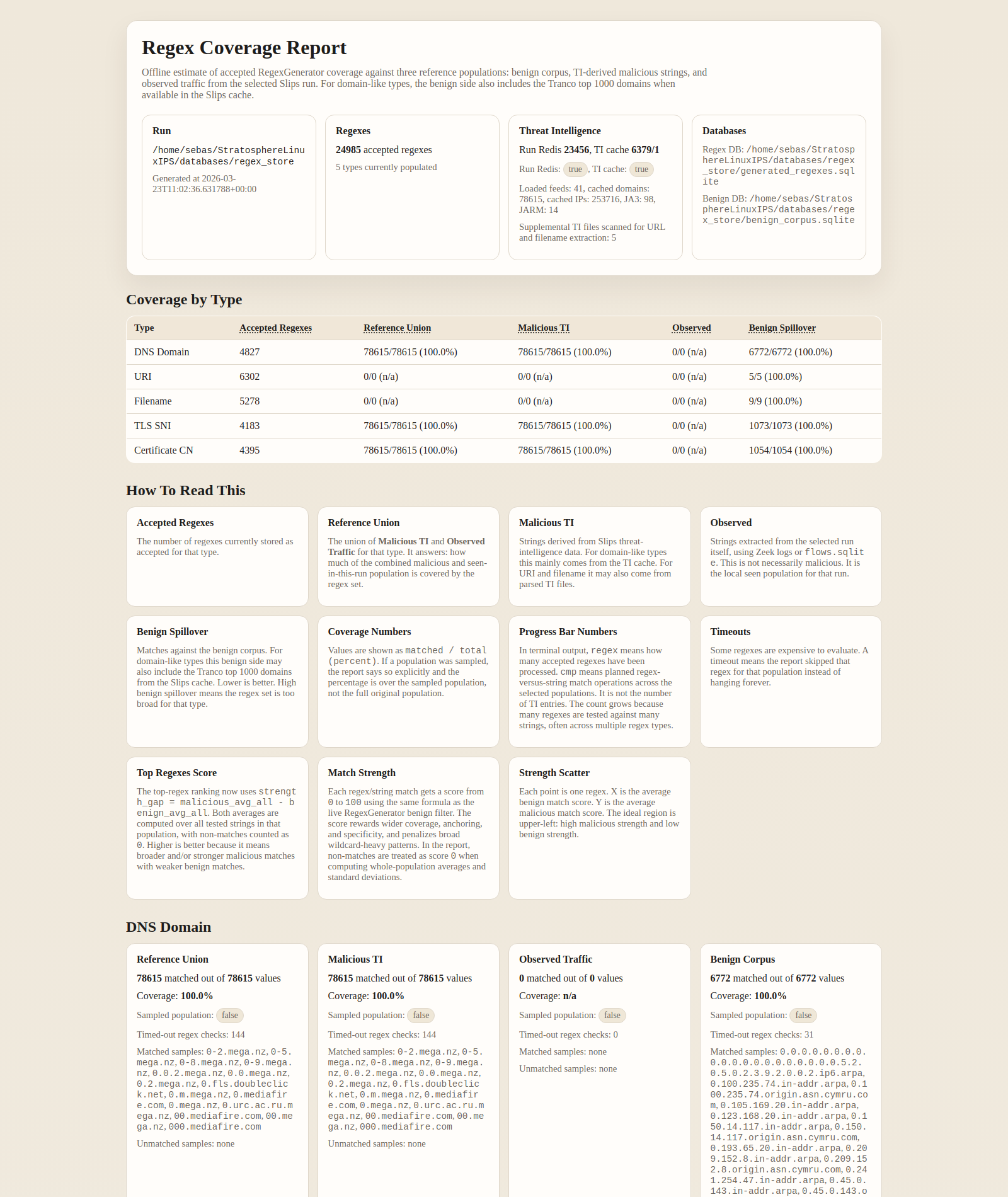
This report is useful for explaining the module because it shows, in one page, how many accepted regexes exist for each data type, how strongly they cover the reference-union and malicious TI populations, and how much benign spillover remains after negative selection.
Example:
./venv/bin/python scripts/regex_coverage_report.py \
  --run-output-dir output/eno1_2026-03-18_10:00:30 \
  --redis-port 6379
By default, large populations are sampled so the script finishes in practical time. It prints terminal progress while it runs, for example:
🧪 sampled estimate ███████░░░░░░░░░░░░ 31.62% | regex 247/781 | cmp 560,840/1,770,991 | type DNS Domain | ETA ⏳ 00:00:14
In that progress line:
regex 247/781means 247 accepted regexes have been evaluated out of 781 total accepted regexes.cmp 560,840/1,770,991means regex-versus-string match operations, not raw TI entries. The number grows because many regexes are checked against many strings across the benign corpus, malicious TI, observed traffic, and reference-union populations.
The report reuses the same 0..100 match-strength function as the live
generator, but it applies it to every regex/string comparison in the selected
populations:
non-match: score
0match: the same span/anchor/specificity/wildcard formula used by
RegexGenerator
For each regex and each population, the report computes:
match_count: number of strings matched at allavg_all ± std_all: average and standard deviation over all tested strings, with non-matches counted as0avg_match ± std_match: average and standard deviation over only the strings that matched
The top-regex ranking uses:
strength_gap = malicious_avg_all - benign_avg_all
So the “best” regexes in the report are the ones that are stronger and/or broader on malicious strings while staying weak on benign strings.
The HTML output also adds a Strength Scatter plot per regex type:
X axis: benign
avg_allY axis: malicious
avg_allideal area: upper-left
This gives a faster view of many regexes than a table alone.
If you want the exhaustive run for research, use:
./venv/bin/python scripts/regex_coverage_report.py \
  --run-output-dir /path/to/regex_store \
  --redis-port 23456 \
  --ti-cache-port 6379 \
  --ti-cache-db 1 \
  --full-scan
Useful knobs:
--sampling-ratio: fraction of strings to evaluate from each regex-type population in estimate mode. This is applied separately to the benign corpus values, malicious TI values, observed traffic values, and reference-union values. Default:0.1.--max-population-size: hard cap on the number of strings evaluated for each regex type inside each population, after--sampling-ratiois applied.--full-scan: disable both--sampling-ratioand--max-population-size, and scan all strings in all populations for every regex type.--match-timeout-seconds: timeout for one regex tested against one regex-type population of strings.
The script writes:
regex_generator_coverage_report.htmlregex_generator_coverage_report.json
inside the selected run output directory.
The estimate is based on:
the RegexGenerator benign corpus DB, grouped by regex type
the configured Tranco top benign domains from
whitelists.tranco_top_benign_limitas extra benign data for domain-like types, when available in the Slips cacheTI-derived malicious reference strings from Redis and TI cache files, grouped by regex type
observed traffic strings from Zeek logs or
flows.sqlite, grouped by regex typethe per-type reference union, which is
malicious TI ∪ observed traffic
This is an offline report only. It does not run continuously inside Slips.