| Module |
Description |
Status |
| ARP |
Finds ARP scans and MITM with ARP in the local networrk. |
✅ |
| Exporting Alerts |
Exports Slips alerts to Slack servers and STIX servers. |
✅ |
| IP Info |
Finds Geolocation country, and ASN for an IP address. |
✅ |
| CESNET |
Send and receive alerts from warden servers. |
✅ |
| Risk IQ |
Finds information from RiskIQ, such as passive DNS for domains and downloads the Threat Intelligence feed. |
✅ |
| Update Manager |
Takes care of downloading each of the files used by Slips, but only if there is a need to update them. It stores and checks the ETags of remote files to know if they changed. It can be configured to update each file with a different frequency. Most importantly it updates all the Threat Intelligence feeds. |
✅ |
| Threat Intelligence |
Checks if any domain or IP is included in Threat Intelligence feeds. Domains include DNS requests, DNS replies, HTTP hostnames, and TLS SNI. IPs include source and destination IPs, both IPv4 and IPv6. |
✅ |
| HTTPS |
training&test of RandomForest to detect malicious https flows |
⏳ |
| Port Scan Detector |
detects Horizontal and Vertical port scans |
✅ |
| Timeline |
creates a timeline of what happened in the network based on all the flows and type of data available |
✅ |
| RNN C&C Detection |
detects command and control channels using recurrent neural network and the stratosphere behavioral letters |
✅ |
| VirusTotal |
module to lookup IP address on VirusTotal |
✅ |
| Flow Alerts |
Finds malicious behaviours by analyzing one flow at a time. It detects self-signed certificates, invalid TLS certificates, Zeek vertical and horizontal port-scan notices, long connections, successful SSH, DNS and connection heuristics, SMTP bruteforce, and related per-flow behaviours. |
✅ |
| Bruteforcing |
Detects SSH bruteforcing from repeated SSH sessions, SSH authentication metadata, client banners from software.log, and Zeek SSH password-guessing notices. |
✅ |
| Leak Detector |
module to detect leaks of data in the traffic using YARA rules |
✅ |
| ARP |
module to check for ARP attacks in ARP traffic |
✅ |
| HTTP Analyzer |
module to analyze HTTP traffic. |
✅ |
| Blocking |
Blocks the alerted IPs in the Linux iptables Firewall. |
✅ |
| Flow ML Detection |
module to detect malicious flows using machine learning |
✅ |
## Bruteforcing Module
The `Bruteforcing` module is responsible for SSH bruteforcing detection.
It consumes:
- `ssh.log`
- `software.log`
- `notice.log`
It correlates repeated SSH sessions by source IP, destination IP, destination port, and time window. It starts alerting at `9` attempts by default, reports sparsely as the count grows, uses the SSH client banner to adjust confidence, and uses Zeek `SSH::Password_Guessing` notices as confirmation.
For the full design and configuration details, see:
- [Bruteforcing Module](bruteforcing.md)
## HTTPS Anomaly Detection Module
For the full technical description of the HTTPS anomaly detector (features, training, adaptation, z-score logic, evidence format, and configuration), see:
- [HTTPS Anomaly Detection](https_anomaly_detection.md)
The module ships with a local HTML report generator that visualizes detections, confidence levels, and top anomaly reasons from `anomaly_detection_https.log`.
### Virustotal Module
This module is used to lookup IPs, domains, and URLs on virustotal.
To use it you need to add your virustotal API key in ```config/vt_api_key```
### RiskIQ Module
This module is used to get different information (passive DNS, IoCs, etc.) from [RiskIQ](https://www.riskiq.com/)
To use this module your RiskIQ email and API key should be stored in ```config/RiskIQ_credentials```
the format of this file should be the following:
```
example@domain.com
e3b0c44298fc1c149afbf4c8996fb92427ae41e4649b934ca495991b7852b855
```
The hash should be your 64 character API Key.
The path of the file can be modified by changing the ```RiskIQ_credentials_path``` parameter in ```config/slips.yaml```
## RNN C&C Detection Module
This module is used to detect command and control channels in a network by analyzing the features of the network flows and representing them as Stratosphere Behavioral Letters(Stratoletters). This is achieved through the use of a recurrent neural network, which is trained on these letters to identify and classify potential C&C traffic.
### Strato letters
Stratoletters is a method used to represent network flows in a concise and standardized manner.
Stratoletters encodes information about the periodicity, duration, and size of network flows into a string of letter(s) and character(s).
The **letter** is the key part in a Stratoletter string. It is derived from a dictionary and defined based on the features of the flow such as periodicity, size and duration.
*periodicity* : A number that denotes how frequent the flow is, calculated based on time of past flows
-1 = No previous data
1-4 = 1 strongly periodic to 4 strongly not periodic
*size* : Number denotes the size of flow, range from 1 to 3
*duration* : Number that denotes the duration of flow, range from 1 to 3
A visual representation of the dictionary from which letter is derived
In this image, each block represents the possible values of the letter,
We choose the block based on the periodicity
and choose the letter from the block based on the duration(number of row) and size (number of column).
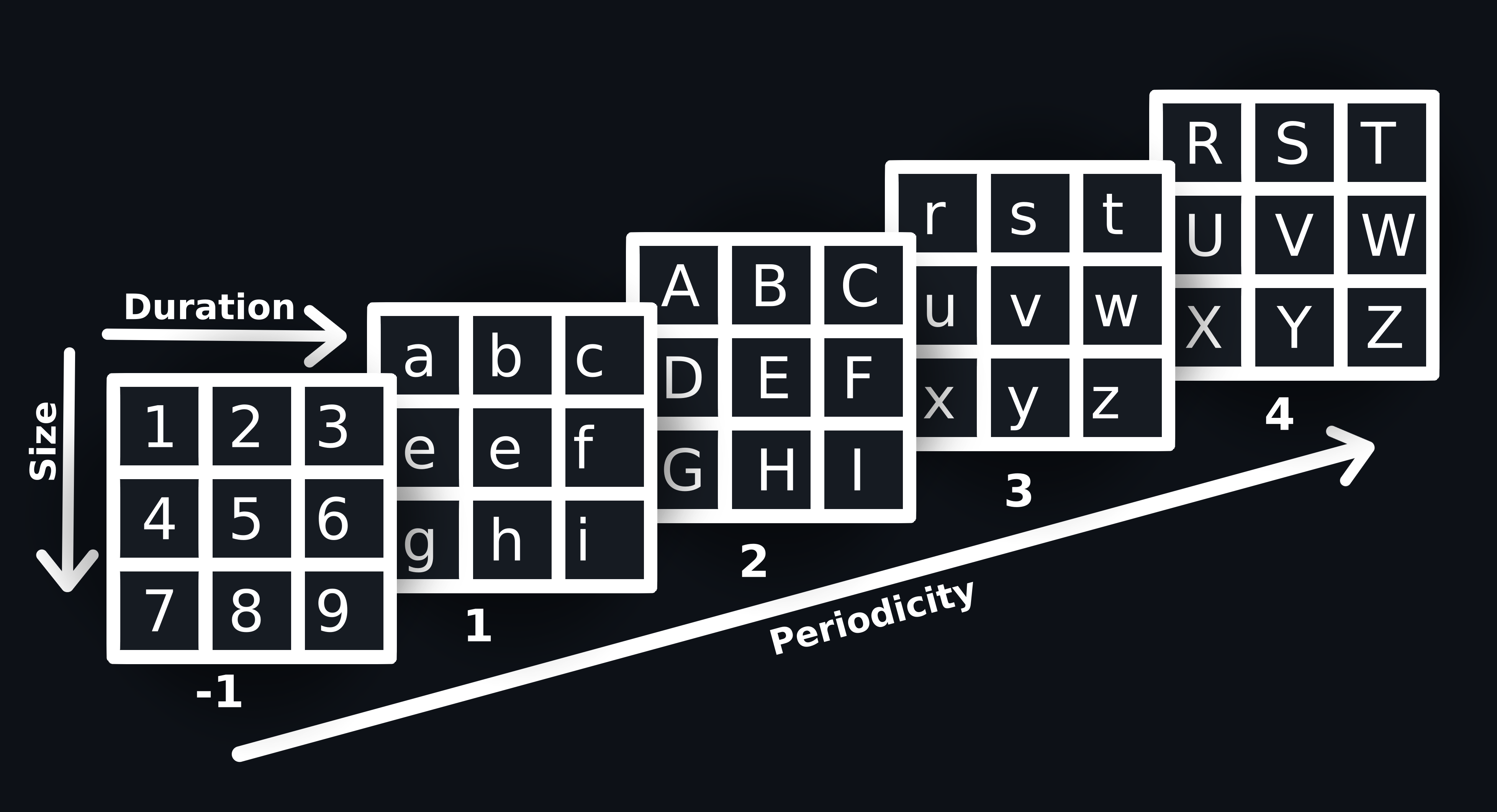
Example:
```commandline
# Slips computed value of the flow
periodicity = 1 # Strongly periodic
duration = 1
size = 3
letter = g # lowercase letter for periodicity 1(Strongly periodic) and 3(Weakly not periodic)
```
```commandline
periodicity = -1 # no previous flow data
duration = 2
size = 3
letter = 8 # the letter will be an integer if there is no previous data
```
```commandline
periodicity = 4 # Weakly not periodic
duration = 3
size = 3
letter = Z # uppercase letter for periodicity 2(Weakly periodicity) and 4(Strongly not periodicity)
```
Stratoletters represent details of current flow and past available flow with latest on left. The current flow symbol is concise of three parts.
each symbol consists of hrs passed since last flow + a letter that represents the periodicity,size and dur of the
flow + a char showing the time passed since last flow
```
symbol = zeros + letter + timechar
```
*zero* : hours passed since last flow, each hour is represented by 1 zero. foe xample, 2 hours = ```00```
*letter* : chosen based on the periodicity, size, and dur of the flow eg: `1`,`w`,`H`
*timechar* : character to denote the time eloped since last flow, can be: `.`, `,`, `+`, `*` or null
Ultimately this is how a Stratoletter is formed
```commandline
No of hours passed since last flow = 2
periodicity = 2 # Weakly not periodicity
duration = 1
size = 1
timechar =
stratoletter of last flow = 9*z*
letter = A
symbol = 00A9*z*
No of hours passed since last flow = 0
periodicity = 3 # Weakly not periodic
duration = 1
size = 2
timechar = *
stratoletter of last flow = e.
letter = u
symbol = u*e.
```
Then the model will predict how secure each flow is based on the Stratoletter
```commandline
symbol = 99*z*i.i*
model_score = 0.9573354
symbol = 99.
model_score = 0.9063127
symbol = 77*g.g*g*g.g.g.g*x*x*x*g.g.
model_score = 0.96772265
```
In first example **9** is Stratoletter of current flow. **9*** is previous one, **z*** is before that and so on.
## Leak Detection Module
This module on runs on pcaps, it uses YARA rules to detect leaks.
You can add your own YARA rule in ```modules/leak_detector/yara_rules/rules``` and it will be automatically compiled and stored in ```modules/leak_detector/yara_rules/compiled``` and matched against every pcap.
## Blocking Module
Blocking in Slips is done for any IP that results in an alert. If an IP is detected as malicious and is blocked,
it stays blocked forever, unless it is unblocked manually.
The feature of unblocking IPs after a while is not supported yet.
The blocking is done using iptables, and the blocked IPs are stored in the database for future reference.
Blocking is disabled by default. To enable blocking in slips, start slips with the ```-p``` flag.
This feature is only supported in linux using iptables when running on an interface.
## Exporting Alerts Module
Slips supports exporting alerts to other systems using different modules (ExportingAlerts, CESNET sharing etc.)
For now the supported systems are:
- Slack
- TAXII Servers (STIX format)
- Warden servers
- suricata-like JSON format
- Logstash
Refer to the [exporting section of the docs](https://stratospherelinuxips.readthedocs.io/en/develop/exporting.html) for detailed instructions on how to export.
## Flowalerts Module
This module is responsible for detecting malicious behaviours in your traffic.
Refer to the [Flowalerts section of the docs](https://stratospherelinuxips.readthedocs.io/en/develop/flowalerts.html) for detailed explanation of what Slips detects and how it detects.
## Disabled alerts
All Slips detections are turned on by default, You can configure which alerts you want to enable/disable in ```config/slips.yaml```
Slips support disabling unwanted alerts, simply add the detection you want to disable in
the ```disabled_detections``` list and slips will not generate any alerts of this type.
for example:
disabled_detections = [MaliciousJA3, DataExfiltration, SelfSignedCertificate]
Supported detections are:
ARPScan, ARP-outside-localnet, UnsolicitedARP, MITM-ARP-attack, SSHSuccessful,
LongConnection, MultipleReconnectionAttempts,
ConnectionToMultiplePorts, InvalidCertificate, UnknownPort, Port0Connection,
ConnectionWithoutDNS, DNSWithoutConnection,
MaliciousJA3, DataExfiltration, SelfSignedCertificate, VerticalPortscan,
HorizontalPortscan, Password_Guessing, MaliciousFlow,
SuspiciousUserAgent, multiple_google_connections, NETWORK_gps_location_leaked,
Command-and-Control-channels-detection,
ThreatIntelligenceBlacklistDomain, ThreatIntelligenceBlacklistIP,
MaliciousDownloadedFile, DGA, MaliciousSSLCert, YoungDomain, MultipleSSHVersions
DNS-ARPA-Scan, SMTPLoginBruteforce, BadSMTPLogin,
IncompatibleUserAgent, ICMP-Timestamp-Scan, ICMP-AddressScan, ICMP-AddressMaskScan
## Threat Intelligence Module
Slips has a complex system to deal with Threat Intelligence feeds. The Threat Intelligence Module in Slips is designed to enhance detection capabilities, utilizing both external and internal thread intelligence sources.
Slips supports various indicators of compromise (IoCs) from Threat Intelligence (TI) feeds, including IPs, IP ranges, domains, JA3 hashes, and SSL hashes. This provides comprehensive coverage against potential threats
While file hashes and URLs aren't supported in TI feeds directly, Slips compensates by integrating with specialized external services for these types of IoCs.
### External Threat Intelligence Services
Besides searching 40+ TI files for every IP/domain Slips encounters, Slips integrates with the following external threat intelligence services to enrich its detection capabilities:
**URLhaus**: This service is utilized for checking URLs observed in `http.log` and files observed in `files.log` against known malicious URLs and files. URLhaus provides a comprehensive database of malicious URLs, which Slips queries to determine if observed URLs or files are associated with known malware or phishing campaigns.
**Spamhaus**: Spamhaus is used for inbound traffic IP lookups to assess the reputation of IP addresses encountered during the analysis. By querying Spamhaus, Slips can identify IP addresses associated with spamming activities, botnets, and other malicious behaviors, enhancing its ability to detect and alert on suspicious network traffic.
**Circl.lu**: Circl.lu's service is leveraged for hash lookups, particularly for downloaded files. Each file hash extracted from `files.log` is checked against Circl.lu's extensive database of known malicious file hashes. This integration allows Slips to identify and react to the transfer or presence of known malicious files within the monitored network environment.
Circllu returns scores (`hashlookup:trust`) for each md5. this score ranges from 0 to 100, with 0 being the most malicious.
This score is converted to a value that slips can deal with using the following equation
```python
malicious_percentage = 100 - circll_score
# scale the benign percentage from 0 to 1
threat_level = float(malicious_percentage) / 100
```
And then it's converted to a string threat level using the table in https://stratospherelinuxips.readthedocs.io/en/develop/architecture.html#threat-levels
**URLhaus Access**:
- **Purpose**: Identify malicious URLs and files.
- **Method**: Slips queries the URLhaus API with URLs and file hashes observed in network traffic logs.
- **Response Handling**: If a URL or file is found in the URLhaus database, Slips generates an alert indicating the presence of a known threat.
**Spamhaus Access**:
- **Purpose**: Assess the reputation of IP addresses.
- **Method**: IP addresses are queried against Spamhaus's DNSBL (DNS-based Block List).
- **Response Handling**: Slips interprets the DNSBL response to determine if an IP address is associated with known malicious activities, triggering alerts accordingly.
**Circl.lu Access**:
- **Purpose**: Perform hash lookups for downloaded files.
- **Method**: File hashes are checked against Circl.lu's database via their API.
- **Response Handling**: Matches with known malicious hashes result in the generation of alerts to inform about potential threats.
By integrating these external services, Slips significantly enhances its detection capabilities, allowing for real-time alerting on threats identified through global intelligence feeds. This integration not only broadens the scope of detectable threats but also contributes to the overall security posture by enabling proactive responses to emerging threats.
### Matching of IPs
Slips gets every IP it can find in the network (DNS answers, HTTP destination IPs, SSH destination IPs, etc.)
and tries to see if it is in any blacklist.
If a match is found, it generates an evidence, if no exact match is found,
it searches the Blacklisted ranges taken from different TI feeds.
### Matching of Domains
Slips gets every domain that can find in the network and tries to see if it is in any blacklist.
The domains are currently taken from:
- DNS requests
- DNS responses
- HTTP host names
- TLS SNI
Once a domain is found, it is verified against the downloaded list of domains
from the blacklists defined in ```ti_files``` path in the configuration file ```config/slips.yaml```.
which is ```config/TI_feeds.csv``` by default.
If an exact match is found, then an evidence is generated.
If an exact match is not found, then Slips verifies if the verified domain is a
subdomain of any domain in the blacklist.
For example, if the domain in the traffic is _here.testing.com_,
Slips first checks if the exact domain _here.testing.com_ is in any blacklist,
and if there is no match, it checks if the domain _testing.com_ is in any blacklists too.
Slips also sets evidence about DNS answers of blacklisted domains. If test.com is blacklisted, and test.com resolves to 1.2.3.4, slips sets
an evidence when it encouters the DNS answer with 1.2.3.4.
### Matching of JA3 Hashes
Every time Slips encounters an TLS flow,
it compares each JA3 and JA3s with the feeds of malicious JA3 and alerts when
there’s a match.
Slips is shipped with the Abuse.ch JA3 feed by default
You can add your own SSL feed by appending to the ```ja3_feeds``` key in ```config/slips.yaml```
### Matching of SSL SHA1 Hashes
Every time Slips encounters an SSL flow, it tries to get the certificate hash from zeek ssl.log,
then it compares the hash with our list of blacklisted SSL certificates
Slips is shipped with the Abuse.ch SSL feed by default,
You can add your own SSL feed by appending to the ```ssl_feeds``` key in ```config/slips.yaml```
### Matching of ASNs
Every time Slips sees a new IP, it stores info about it in the db, for example its organization, RDNs, and ASN.
If the ASN of an IP matches a blacklisted ASN, slips alerts.
Blacklisted ASNs are read from out local TI file ```config/local_data_files/own_malicious_iocs.csv```,
so you can update them or add your own.
### Local Threat Intelligence files
Slips has a local file for adding IoCs of your own,
it's located in ```config/local_data_files/own_malicious_iocs.csv``` by default,
this path can be changed by changing ```download_path_for_local_threat_intelligence``` in ```config/slips.yaml```
The format of the file is "IP address/IP Range/domain/ASN","Threat level", "Description"
Threat level available options: info, low, medium, high, critical
Refer to the [architecture section of the docs](https://stratospherelinuxips.readthedocs.io/en/develop/architecture.html) for detailed explanation of Slips threat levels.
Example:
"23.253.126.58","high","Simda CC"
"bncv00.no-ip.info", "critical", "Variant.Zusy"
### Local JA3 hashes
Slips has a local file for adding JA3 hashes of your own,
it's located in ```config/local_data_files/own_malicious_JA3.csv``` by default.
The format of the file is "JA3 hash", "Threat level", "Description"
Threat level available options: info, low, medium, high, critical
Refer to the [architecture section of the docs](https://stratospherelinuxips.readthedocs.io/en/develop/architecture.html) for detailed explanation of Slips threat levels.
Example:
"e7d705a3286e19ea42f587b344ee6865","medium","Standard tor client"
"6734f37431670b3ab4292b8f60f29984", "high", "Trickbot Malwar"
### Whitelisting known FP hashes
To avoid false positive "Malicious downloaded file" detections, before looking up MD5 hashes of each downloaded file online, Slips checks if the given hash is part of a known FP.
The list of known FP MD5 hashes is at config/local_ti_files/known_fp_md5_hashes.csv. This list is taken from https://github.com/Neo23x0/ti-falsepositives/tree/master
If the hash is a part of that list, Slips doesn't look it up.
### Adding your own remote feed
We update the remote ones regularly. The list of remote threat intelligence
files is set in the path of ```ti_files``` variable in ```config/slips.yaml```.
The path of all the TI feeds is in ```config/TI_feeds.csv``` by default.
You can add your own remote threat intelligence feeds in this variable.
Supported extensions are: .txt, .csv, .netset, ipsum feeds, or .intel.
Each URL should be added with a threat_level and a tag, the format is (url,threat_level,tag)
tag is which category is this feed e.g. phishing, adtrackers, etc..
Threat level available options: info, low, medium, high, critical
Refer to the [architecture section of the docs](https://stratospherelinuxips.readthedocs.io/en/develop/architecture.html) for detailed explanation of Slips threat levels.
TI files commented using # may be processed as they're still in our database.
Use ```;``` for commenting TI files in ```config/slips.yaml``` instead of ```#```.
Commented TI files (lines starting with ;) will be completely removed from our database.
The remote files are downloaded to the path set in the ```download_path_for_local_threat_intelligence```.
By default, the files are stored in the Slips directory ```modules/ThreatIntelligence1/remote_data_files/```
are deleted after slips is done reading them.
Domains found in remote feeds are considered invalid, and therefore discarded by Slips,
if they have suffix that doesn't exist in
https://publicsuffix.org/list/public_suffix_list.dat
### Commenting a remote TI feed
If you have a remote file link that you wish to comment and remove from the database
you can do so by adding ';' to the line that contains the feed link in ```config/TI_feeds.csv```, don't use the '#'
for example to comment the ```bruteforcelogin``` feed you should do the following:
;https://lists.blocklist.de/lists/bruteforcelogin.txt, medium,['honeypot']
instead of:
#https://lists.blocklist.de/lists/bruteforcelogin.txt,medium,['honeypot']
## Update Manager Module
To make sure Slips is up to date with the most recent IoCs in all feeds,
all feeds are loaded, parsed and updated periodically and automatically by
Slips every 24 hours, which requires no user interaction.
The 24 hours interval can be changed by changing the ```TI_files_update_period``` key in ```config/slips.yaml```
Update manager is responsible for updating all remote TI files (including SSL and JA3 etc.)
By default, local slips files (organization_info, ports_info, etc.) are
cached to avoid loading and parsing
then everytime we start slips. However, they are updated automatically by
the update manager if they were changed on disk.
Only one slips instance is allowed to be using the update manager at a time to avoid race conditions.
By default, slips starts without the TI files, and runs the Update Manager in the background
if the ```wait_for_TI_to_finish``` option in slips.yaml is set to yes, slips will not start until the update manager is done
and all TI files are loaded successfully,
this is useful if you want to ensure that slips doesn't miss
the detection of any blacklisted IPs, but it adds some time to the startup of slips
since it will be downloading, parsing, and caching 45+ different TI feeds.
## IP Info Module
The IP info module has several ways of getting information about an IP address, it includes:
- ASN
- Country by Geolocation
- Given a MAC, its Vendor
- Reverse DNS
### ASN
Slips is shipped with an offline database (GeoLite2) in ```databases/GeoLite2-ASN.mmdb```
to search for ASNs, if
the ASN of a given IP is not in the GeoLite2 database, we try to get the ASN online
using the online database using the ```ipwhois``` library.
However, to reduce the amount of requests, we retrieve the range of the IP and we cache the whole range.
To search and cache the whole range of an IP, the module uses the ipwhois library.
The ipwhois library gets the range of this IP by making a connection to the server ```cymru.com``` using a TXT DNS query.
The DNS server is the one set up in the operating system. For example to get the ASN of the IP 13.32.98.150,
you will see a DNS connection asking for the TXT record of the domain ```150.98.32.13.origin.asn.cymru.com```.
### Country by Geolocation
Slips is shipped with an offline database (GeoLite2) in ```databases/GeoLite2-Country.mmdb```
to search for Geolocation.
### Mac Vendors
Slips is shipped with an offline database ```databases/macaddress-db.json``` for
MAC address vendor mapping.
Slips updates this database by default every 2 weeks using the following online db
https://maclookup.app/downloads/json-database/get-db?t=22-08-19&h=d1d39c52de447a7e7194331f379e1e99f94f35f1
You can change how often this db is updated by changing the value of
```mac_db_update``` in ```config/slips.yaml```.
Slips gets the MAC address of each IP from dhcp.log and arp.log and then searches the offline
database using the OUI.
If the vendor isn't found in the offline MAC database,
Slips tries to get the MAc using the online database https://www.macvendorlookup.com
The offline database is updated manually and shipped with slips, you can find it in
the ```databases/``` dir.
Slips makes sure it doesn't perform duplicate searches of the same MAC Address either online, or offline.
## Reverse DNS
This is obtained by doing a standard in-addr.arpa DNS request.
## ARP Module
This module is used to check for ARP attacks in your network traffic.
By default, zeek doesn't generate and log ARP flows, but Slips is shipped with it's
own zeek scripts that enable the logging of ARP flows in ```arp.log```
The detection techniques are:
- ARP scans
- ARP to a destination IP outside of local network
- Unsolicited ARP
- MITM ARP attack
### ARP Scans
Slips considers an IP performing an ARP scan if it sends 5
or more non-gratuitous ARP to different destination addresses in 30 seconds or less.
### ARP to a destination IP outside of local network
Slips alerts when an ARP flow is being sent to an IP outside of local network as it's a weird behaviour
that shouldn't be happening.
### Unsolicited ARP
Unsolicited ARP is used to update the neighbours' ARP caches but can also be used in ARP spoofing, we detect it with
threat level 'info', so we don't consider it malicious, we simply notify you about it.
### MITM ARP attack
Slips detects when a MAC with IP A, is trying to tell others that now that MAC
is also for IP B (ARP cache attack)
## CESNET sharing Module
This module is responsible for importing and exporting alerts from and to warden server
Refer to the [exporting section of the docs](https://stratospherelinuxips.readthedocs.io/en/develop/exporting.html)
for detailed instructions on CESNET exporting and the format of the configuration files.
To enable the importing alerts from warden servers,
set ```receive_alerts``` to ```yes``` in config/slips.yaml
Slips imports 100 alerts from warden servers each day, and automatically stores the IoCs in our database
Time to wait before receiving alerts from warden server is 1 day by default, you can change this
by chaning the ```receive_delay``` in ```config/slips.yaml```
These are the categories Slips imports:
['Availability', 'Abusive.Spam','Attempt.Login', 'Attempt', 'Information', 'Fraud.Scam', 'Information', 'Fraud.Scam']
## HTTP Analyzer Module
This module handles the detections of HTTP flows
Available detection are:
- Multiple empty connections
- Suspicious user agents
- Incompatible user agents
- Multiple user agents
- Pastebin downloads
- Unencrypted HTTP traffic
- Non-HTTP connections on port 80.
### Multiple empty connections
Due to the usage of empty connections to popular site by malware to check for internet connectivity,
We consider this type of behaviour suspicious activity that shouldn't happen
We detect empty connection to 'bing.com', 'google.com', 'yandex.com', 'yahoo.com' , 'duckduckgo.com' etc.
If Google is whitelisted in `whitelist.conf`, this detection will be suppressed.
### Suspicious user agents
Slips has a list of suspicious user agents, whenever one of them is found in the traffic, slips generates
and evidence.
Our current list of user agents has:
['httpsend', 'chm_msdn', 'pb', 'jndi', 'tesseract']
### Incompatible user agents
Slips uses and offline MAC address database to detect the type of device based on the MAC OUI.
First, Slips store the MAC address and vendor of every IP it sees (if available)
Second, When slips encounters a user agent in HTTP traffic it performs an online
query to http://useragentstring.com to get more info about this user agent,
like the os type, name and browser.
Third, When slips has both information available (MAC vendor and user agent),
it compares them to detect incompatibility using a list of keywords for each operating system.
Available keywords for Apple: ('macos', 'ios', 'apple', 'os x', 'mac', 'macintosh', 'darwin')
Available keywords for Microsoft: ('microsoft', 'windows', 'nt')
Available keywords for Android: ('android', 'google')
### Multiple user agents
Slips stores the MAC address and vendor of every IP it sees
(if available) in the redis database. Then, when an IP iss seen
using a different user agent than the one stored in the database, it tries to extract
os info from the user agent string, either by performing an online
query to http://useragentstring.com or by using zeek.
If an IP is detected using different user agents that refer to different
operating systems, an alert of type 'Multiple user agents' is made
for example, if an IP is detected using a macOS user agent then an android user agent,
slips detects this with 'low' threat level
### Pastebin downloads
Some malware use pastebin as the host of their malicious payloads.
Slips detects downloads of files from pastebin through HTTP with size >= 700 bytes.
This value can be customized in slips.yaml by changing ```pastebin_download_threshold```
When found, slips alerts pastebin download with threat level low because not all downloads from pastebin are malicious.
### Unencrypted HTTP traffic
When slip sees an HTTP unencrypted traffic in zeek's http.log it generates
an evidence with threat_level low
### Non-HTTP connections on port 80
Slips detects established connections on port 80 that are not using HTTP
using zeek's conn.log flows
if slips finds a flow using destination port 80 and the 'service' field
in conn.log isn't set to 'http', if means zeek didnt recognize that flow as http.
Slips makes sure no matching flows were detected as HTTP by zeek
within 5 mins before or after the given flow. if not, slips sets an evidence saying
"non http established conn on port 80"
## Leak Detector Module
This module work only when slips is given a PCAP
The leak detector module uses YARA rules to detect leaks in PCAPs
### Module requirements
In order for this module to run you need: